Form Processing
A comprehensive study guide on how demographic form data is transmitted, bound, validated, and processed within an ASP.NET Core MVC application.
The Lifecycle of Form Interaction: GET and POST
Interacting with web forms relies on distinct HTTP methods to manage state and transport data. Understanding these underlying requests is critical for web development architecture.
- HTTP GET: Used to request resources and display pages. When a user navigates to the form, the browser sends a GET request with no body, and the server returns the HTML form view.
- HTTP POST: Used to submit user-entered data securely to the server inside the request body rather than exposing parameters in the URL.
Example Control Flow Sequence
The standard interaction follows a predictable path through the application:
GET /Demographics/Edit— Requests and displays the empty or pre-filled form.POST /Demographics/Edit— Submits the completed form data back to the controller.GET /Demographics— Redirects and displays the saved summary data upon successful validation.
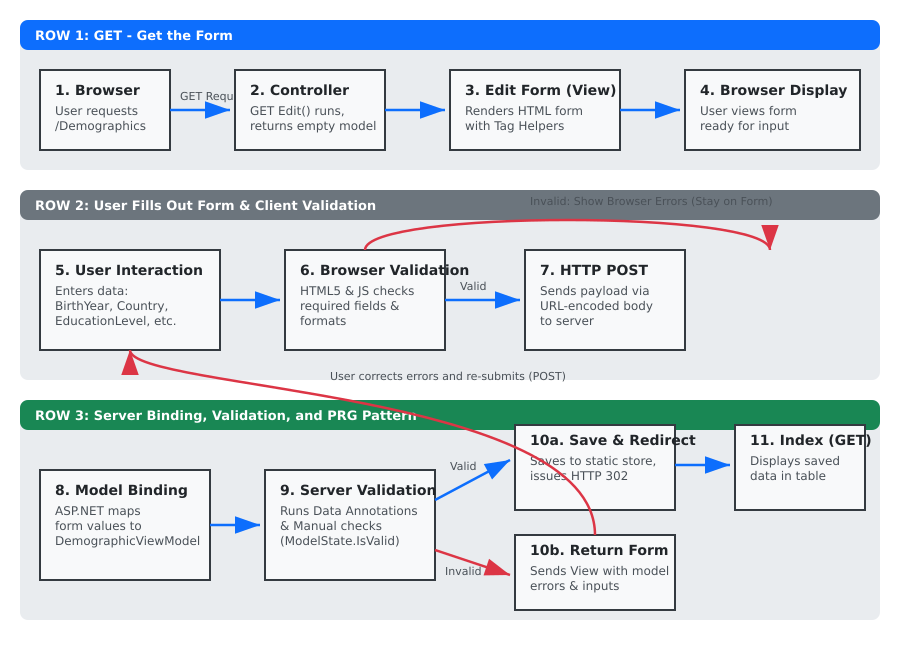
Name/Value Pairs and Model Binding
When a user fills out a form and clicks submit, the browser packages the input fields into name/value pairs using
application/x-www-form-urlencoded encoding.
The HTML name attribute is the vital link connecting these transmitted values to the C# code.
For example, an input with name="Country" sends a pair where the key matches the ViewModel property name.
ASP.NET Core model binding automatically intercepts these incoming name/value pairs, matches them against
the properties of the DemographicViewModel, converts data types, and instantiates a fully populated object
for the controller action to process.
Validation and Control Flow Logic
Data integrity requires verifying user input on both the client side and the server side. ASP.NET Core manages this through two primary validation strategies:
- Attribute-Based Validation: Declarative data annotations (such as
[Required]or[StringLength]) placed directly on the ViewModel properties automatically evaluate incoming data. - Manually Coded Controller Validation: Custom business rules—such as validating the
BirthYearrange or cross-field constraints between full-time employment status and years worked—are written explicitly inside the controller action using methods likeModelState.AddModelError().
Understanding ModelState and Action Outcomes
ModelState.IsValid acts as the gatekeeper for the controller, evaluating whether all attribute-based and manual validation rules passed without error.
Depending on this evaluation, the controller directs the application flow:
- Invalid POST Action: If validation fails, the controller returns the Edit view with the current model instance. This prevents saving corrupt data, preserves the values the user already typed, and renders error messages on the form.
- Valid POST Action: If validation succeeds, the controller saves the data and executes a redirect using the Post-Redirect-Get (PRG) pattern. Redirecting to the Index page prevents accidental duplicate form submissions if the user refreshes their browser.
Storage Limitations and Static Fields
For this foundational milestone, the application stores submitted information inside a private static DemographicViewModel? currentDemographic; field directly inside the controller.
Because it is static, this data lives entirely in server memory.
As soon as the application restarts, the memory is cleared, causing the saved demographic information to disappear completely.
This temporary design is shared across all users and is intentionally replaced by persistent database storage later in the course.